Showing posts with label learning online. Show all posts

Friday, November 13, 2015

Online Instructors are Lazy and Make Students Teach Themselves (False Assumptions Series, #1)

There are many false assumptions abut online learning and the purpose of this blog series is to clear them up. My caveat is that these assumptions are only false when the online teacher is trained* to teach effectively in the online environment. One of the most dangerous assumptions is that a good classroom teacher will be a good online teacher. I believe this to be true with proper training, but without it, classroom teachers often fall short and it's the students who suffer most.

The assumption that instructors are lazy and make students teach themselves probably comes from experiences unfortunate students had with untrained teachers. Some untrained instructors think that to teach an online course you simply need to post readings, PowerPoint slides, quizzes and assignments, assign due dates and grade. This sounds like a face-to-face class without the classroom component. I could certainly see how a student in such a course would feel as if the instructor were absent and she is teaching herself.

So what's missing? The student may say that the teacher isn't teaching anything, which is sort of true. But that's not due to the fact that classroom component is missing. There are many highly successful online courses being offered and none of them involve physical presence. So again we ask, what's missing?
  1. Clarification on content
  2. Timely feedback on demonstrated performance and understanding 
  3. Spontaneous activities and explanations
  4. Interaction with the instructor and classmates
  5. Student-driven discussion and Q&A
  6. A sense of community and humanity
If an online instructor could find a way to incorporate these elements into his course, I am confident that his students would be satisfied with the instruction, support and engagement they experience. And it is certainly possible!

Am I missing any elements? Or do you have a different opinion? Please share your thoughts.

*I do not wish to discount or belittle self-trained instructors. I simply want to emphasize that learning the strategies and techniques for teaching online often leads to success, whereas instructors who do not learn and apply best practices often fall short, even if their intentions are good and their classroom teaching skills are noteworthy.

Wednesday, October 23, 2013

Yes, videos are useful tools for distance learning. But it is still a passive learning experience, right? Not necessarily...

Hearing but not listening

So you developed a great online or blended learning course; it looks as if your students are watching your videos at home, like they are supposed to. But they are still not performing well in their assessments... it is almost as if they are "hearing" but not "listening," "watching" but not "focusing" on the video presentations.

Our attention span for online videos

student talking on phone while on laptopThe truth is that in this fast-paced multitasking society, it is hard to get someone's complete attention, especially when asked to watch a video. According to video marketing research performed by Visible Measures, you lose 20% of viewers in 10 seconds or fewer, 33% by 30 seconds, 45% in 1 minute or less, and almost 60% by 2 minutes. Now these are marketing statistics and are not specific to education, but they do reflect our general attention span for watching online video.

What does that mean for us online and blended/hybrid teachers? It means that our students are probably folding laundry, cooking dinner, talking on the phone, or surfing the internet while "watching" our videos.

There are a lot of techniques we can use to increase the amount of attention students put towards watching our videos and this article will focus on just one: embedded interactives.

Embedded Interactives: Turning a passive video watching experience into active learning and engagement

For many of us, if we know we will have to perform a task after watching a segment of a video, we are more likely to focus because our attention will determine our success in the task. For students, if you award points for successful completion of the task, they have added motivation to pay attention to the video content. Plus, if you make the task(s) engaging, then it's plausible that some may complete the assignment out of sheer interest. Imagine that!

The Tasks

What are these tasks? They can be multiple choice or other quiz-type questions, participation in a discussion, a hotspot activity where students are asked to click on the correct part of a graph, document, photo, schematic drawing, etc. to show understanding, and there are many other possibilities if you take some time to think outside of the box.

But how do you actually create embedded interactives for your video?

A few options for creating interactives for your videos

You have a few options. Here are just a couple, which I recommend to my instructors.

Ted Ed TedEd

Use TedEd "Find + Flip" to modify any YouTube video or any video of your own. Through TedEd's simple interface, you can add up to 15 multiple choice or open-answer questions, a "digging deeper" section where students can learn more, guided and/or open discussions, and concluding thoughts. These activities are presented in order (watch, think, dig deeper, finally...) This online application is very easy to use and free to all.

Camtasia Studio

Use Camtasia Studio to record your video, edit it (by adding in any number of special features such as title and subtitle pages, music, captions, high-quality audio editing, arrows and other callouts) and add in quiz questions. Your options are multiple choice, fill in the blank, short answer, and true/false. Camtasia Studio costs less than $200 if you purchase an education license. This software is relatively easy to learn but does require relative comfort with software applications. Experience with video editing software is a plus.


Blackboard (combine the powers of adaptive release with embedded video and Blackboard tests)

Blackboard adaptive releaseAt Harper College, our Learning Management System (LMS) is Blackboard. By using the adaptive release feature, instructors can embed videos and then have subsequent quizzes and activities populate in the course shell after the video is watched. Blackboard quizzes can be as simple as a series of multiple choice questions, but can include more sophisticated assessment features such as hotspot activities (which is where the student is asked to identify something in an image, and by clicking on the correct zone of the image s/he is able to indicate understanding. For example, you can show an image of a skeleton and ask your students to "click on the femur bone." The students would show understanding by clicking on the correct bone in the skeleton.)
Articulate presentationArticulate

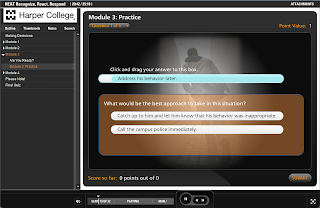
Some schools have Articulate, which is a robust add-on to PowerPoint that allows the user to create interactive learning modules. Here is an example training module created by the Harper College Center for Innovative Instruction in conjunction with the Harper Early Alert Team (HEAT). You'll notice it looks like an interactive PowerPoint contained in a useful user interface. The presentation was in fact created with PowerPoint, and the Articulate add-on is what gave it the user interface and interactive capabilities. If you select "Module 3: Practice" from the outline on the left, you can experience the power of Articulate at its best.

Thursday, August 22, 2013

Capture your lecture, screen and more with Camtasia Relay

What is Camtasia Relay?

Camtasia Relay is an easy-to-use lecture capture tool, which allows you to capture your computer screen, audio and web camera video with the click of a button. One of the unique features that puts Camtasia Relay above other screen capture tools is that it allows you or your administration to automate the workflow; through the creation of profiles, instructors are able to create videos and automatically publish them to specific areas in iTunesU, YouTube, and other file destinations.

Why Use Camtasia Relay? 

For your students: 

  • Video resources allow students to review course content as many times as they need and at any time in the day 
  • Videos make it easy for students who were absent to review important material 

For you: 

  • Videos can help you “flip” your course 
  • At least for us at Harper College, you can use Camtasia Relay to record from the comfort of your home. You simply need to be on campus to upload your videos. Other colleges may have set up their permissions differently, but the infrastructure is there to allow at-home recording. 

What equipment do you need to record with Camtasia Relay? 

  • To record your screen and sound, you simply need your computer and a sound device (microphone, headset or built-in microphone). 
  •  To record your screen, sound and video, you need you computer, a sound device and webcam. What do you need in order to publish to iTunesU from Camtasia Relay? 
  • For Harper instructors, you simply need to be on campus with access to the internet. Recording can take place at home; just bring your laptop to campus, connect to the campus wifi, and your videos will automatically upload. Again, other colleges may set up their permissions differently, but the infrastructure is there to support this and other workflows.   

Best Practices for creating video resources: Shorter is better. 

Try to stay away from videos that are longer than 10 minutes, and preferably, try to keep your videos between 2 – 5 minutes long. Why, you ask?

  • The download time for five 5-minute videos is exponentially faster than the download time for one 25-minute video 
  • Your students may not have the bandwidth to download large files, and the longer the video, the larger the file. Since we strive to democratize learning, we want to make sure that all our students have the ability to access our video resources. 
  • Students are able to focus better on five 5-minute videos than one 25-minute video. 
  • Shorter videos with titles to indicate the content of the video are especially helpful so that if students need to review them later, they can review the one or two sections they need. With a 25 minute (or longer) video, it is harder to find the right section to review since it is one long sequence with no chapter subdivisions.

Wednesday, May 29, 2013

Peer Reviews and Post Replies... Facilitating Effective Student-to-Student Interactions

So you have this great idea... you'll exercise your students' critical thinking skills while asking themto apply what they learned in class by having them complete peer reviews. Nice! Just make sure to work out all the kinks so that the process goes as smoothly as you had hoped.

The Scenario:

I developed a project for my Teaching Online students that involved completing an assignment, posting the assignment to a Blackboard discussion board, and reviewing one other student's assignment. I also specified that students should review work that has no feedback before reviewing any assignments that have already been reviewed. Not only are the students required to reflect carefully on their own assignments, but they are asked to make effort on behalf of their classmates. One of the nice things about projects like this is that if an online community has been developed, students will put extra effort into their peer reviews, because it is not solely about the grade... it's also about helping another community member attain success.


Challenges:

Peer reviews require completed assignments to be reviewed. Only two students were able to complete their assignments well before the due date (Sunday night at 11:59pm); the rest submitted their work late Sunday night, which means that only two people were able to review those assignments, following the directions specified above. Other students were forced to review assignments that already had reviews or face the penalty of late assignment completion. (Of course, I don't penalize my students for being unable to complete the assignment as specified, but I don't let my students know that: A core goal in this class is to develop sensitivity to course structure, delivery, and expectations, and recognize how these factors affect  students.) Students who regularly go above and beyond will most certainly review some of the later submissions, even if they had already reviewed one of the original two, but since we can't count on that, potentially there could be students who receive no peer feedback.

Solutions:

Although many online courses are run by week, you may want to create a midweek deadline for any assignments or discussion threads that need peer reviews or replies. This way, students know that after that deadline, there will be plenty of fodder for their critique, and they can schedule their participation around that date.

Part of the value of this activity is the autonomy to choose the assignment to review (which can mean a wide selection of topics and areas of interest.) Students are often more engaged with an assignment when they have an element of choice. However, depending on your subject matter and class dynamic, it may make sense to assign students as partners. When the students know that they are accountable to one another, they will more likely complete their assignments on time so that their partner will have an assignment to work from. Again, this kind of camaraderie and accountability is more affective when effort was made to build classroom community.

Finally, if for some reason there is a student who does not receive a peer review, I may offer extra credit to students who review any remaining assignments that still need feedback, and I may contact individual students to ask them personally for their feedback. Some students may reluctantly turn me down due to time constraints, but generally, students are flattered that their teacher counts on them when help is needed and want to go the extra mile for that reason. Often times, this personal requests lead to even more commitment on the part of the student because s/he feels personally invested in the course and its success.

Friday, May 10, 2013

Getting Students to Use Blackboard (or other LMS systems)

I have found that instructors who require their students to take quizzes online through Blackboard have a greater success rate in terms of having students acclimate to using Blackboard in general. Since there is no way to score points on a Blackboard quiz unless they enter Blackboard to take it, they are more likely to learn the skills needed and develop the comfort required to log into Blackboard regularly. If they can take a quiz, they can learn to download a file, view a file or upload an assignment in Blackboard. However, if you only use Blackboard to provide course readings or copies of PowerPoint presentations, your students may not make the effort to learn how to retrieve these pieces of information, and my either rely on a classmate or will try to make do without them. The same is true for submitting assignments. If you only use Blackboard for assignment submission, you may find a number of students will simply email you their work. However, the more value they find in Blackboard (that they cannot access otherwise) the more likely your students will take the time to acclimate to the technology. And once they start to use it, they do get comfortable, and in may cases begin to rely upon and value it.

I know that Blackboard can seem intimidating. Where do you start? I would go to Blackboard On-Demand, where you can watch quick how-to videos and even engage in self-assessment practice activities. Find the skill you want to learn and follow the link to a brief but effective tutorial (e.g. uploading course content, which is under "Understanding and Building Your Course" or creating a rubric, which is under "Assessing Learners")

One Way to Find Out Early On if Your Students Are "Tech Savvy"

Some instructors use icebreakers to reveal their students' levels of comfort with technology, which helps them plan how they approach their course. They may ask their students to share their favorite online activities and/or computer programs with one another. They may have the students fill out a quiz or a survey about the technology they use on a regular basis. I am currently developing an online orientation for students that includes a technology review, which will hopefully make students aware of the technical skills they will need in order to be successful in online courses of study. A great existing resource can be found at http://www.digitalliteracyassessment.org/